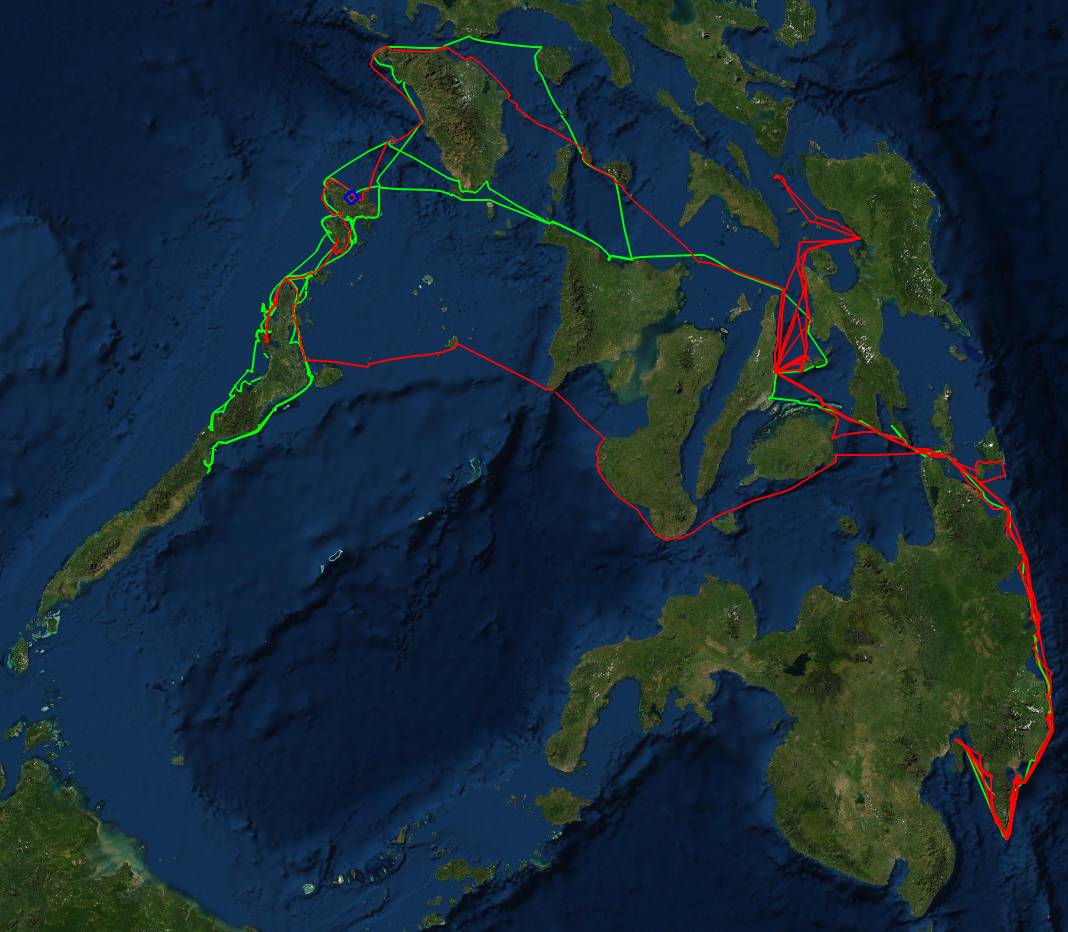
Tracks through the Philippines, Davao (lower right) to Palawan, Ocelot in green, Soggy Paws in red
|
Cruising Info General Info |
Track Files
Cruisers: We are now publishing Downloadable Track Files in OpenCPN (.gpx) format and in MaxSea (.ptf) format (not all tracks are available in all formats yet - we're still working on it and they take time). You can download the track files either by clicking on the links in the tables below, or by clicking on the track in the Google Map below the table. The MaxSea files are in native format but the OpenCPN files are zipped so they download faster, and they need unzipping after they've been downloaded (which most operating systems do natively). If 2 files are shown, the smaller one has been edited to remove redundant points from straight tracks. This improves the speed of the download as well as performance once the file is loaded. Sometimes MaxSea Track files are separated from the Mark (chart notations) files. Download instructions are provided if you need them.
These files are provided free and we are actively soliciting cruisers to send us your track files so we can post them for others to download. If you would like to to participate, please email us your track files (as attachments to our HackingFamily account, not our Winlink acct) along with your boat name and draft. If you include your website and boat details, we'll link back to you from our Cruising Links page.
Disclaimer: While we always try to provide useful information, we can take no responsibility for its accuracy or usefulness. Prudent mariners will always navigate using all means at their disposal, and will not rely solely on electronic navigation.
Track and Layer Files:
Track (or "layer") files can be imported into many navigation programs. They display as
transparent overlays on top of your existing charts and they can be turned on or off with just a few
mouse clicks. They do not affect your underlying charts at all.
Many cruisers like to lay a track of where they've gone -- It provides them with a record and it
can be very useful if they happen to go back there. It's often much easier to leave a well
protected anchorage than it is to enter one, and using a pre-existing track can help. We once
had to guide friends through a gap in the reef in Fiji (at night) and having our track made it much
easier.
Perhaps more importantly, track files are very useful to other cruisers, especially those new to an area. Our charts are usually pretty accurate, especially near population centers, but out in the back of beyond our charts often have inaccuracies. All of Tonga was out by about 1/4 mile, and places like the Philippines can be out by more than 2 miles! This can be very disconcerting when you first arrive in a new area. We have been publishing track files for several years now, and cruisers we talk to really appreciate them. When we were in Madagascar the wind switched 180° one night, putting us on a dangerous lee shore, but we had a friend's track file (and apparently the same thing had happened to them) so we were able to follow their track to a safe anchorage.
We were recently asked to become a repository for cruiser's track files, for both OpenCPN and MaxSea (and possibly others if there's enough demand). This page is a first cut at that. Cruisers who wish to participate, please email your tracks to us as attachments to our HackingFamily acct. OpenCPN track files are basically XML (text) files and can get pretty big, so we've zipped them here with the excellent free 7‑Zip utility to make them easier to download. Windows can unzip the files by itself. Areas are listed from East to West. The Maps links take you to our Cruising Information page for that area (which are in varying states of completeness).
Click the Size link to download the track files
Caribbean Sea Track Files |
Click links to Download | ||||||
| Area | Boat | Draft | Year | Cruising Info | Comments | MaxSea | OpenCPN |
| SE Caribbean | Taniwani | 6.6' (2m) | 2005 | Some Info | Tobago, Grenadines | 12 KB | 6 KB |
| Bonaire | Taniwani | 6.6' (2m) | 2005 | Some Info | Great Diving | 2 KB | 2 KB |
| Curacao | Taniwani | 6.6' (2m) | 2005 | Some Info | Spanish Waters | 3 KB | 4 KB |
| Panama/San Blas | Taniwani | 6.6' (2m) | 2005 | Canal Info | Canal and San Blas | 15 KB | 7 KB |
Pacific Ocean Track Files |
Click links to Download | ||||||
| Area | Boat | Draft | Year | Cruise Info | Comments | MaxSea | OpenCPN |
| Galapagos | Taniwani | 6.6' (2m) | 2005 | Some info | All islands except Isabela | 5 KB | 3 KB |
| Marquesas | Taniwani | 6.6' (2m) | 2005 | Some info | Includes 5 islands | 5 KB | 3 KB |
| Tuamotus | Taniwani | 6.6' (2m) | 2005 | Map Only | Covers 5 atolls | 455 KB / 57 KB | 23 KB |
| Tonga | Ocelot | 4.6' (1.4m) | 2004 | Map Only | Ha'apai & a bit of Vava'u | 57 KB / 6 KB | 4 KB |
| Fiji | Ocelot | 4.6' (1.4m) | 2005 | Some info | Western & southern Fiji | 108 KB / 28 KB | 24 KB |
| Solomon Islands | Ocelot | 4.6' (1.4m) | 2019 | Full Info | NW to Marovo Lagoon | 308 KB | |
| Soggy Paws | 4.6' (1.4m) | 2019 | NW to the Florida Group | 261 KB | |||
| Papua New Guinea | Ocelot | 4.6' (1.4m) | 2019 | Full Info | Northern islands only | 113 KB | |
| New Caledonia | Ocelot | 4.6' (1.4m) | 2005 | Map Only | Covers southern part | 118 KB / 17 KB | 8 KB |
| Australia | Ocelot | 4.6' (1.4m) | 2006 | Full info | Brisbane to Darwin | 420 KB
/
24 KB Marks: 8 KB |
34 KB |
Philippines Tracks
| Boat | Draft | Year | Comments | OpenCPN |
| Ocelot | 4.6' (1.4m) | 2022 | Davao to Palawan plus Mindoro | 225 KB |
| Ocelot | 4.6' (1.4m) | 2022 | Anchorages only (included in above) | 54 KB |
| Soggy Paws | 4.6 (1.4m) | 2021 | Davao to Palawan & back (x2) | 473 KB |
|
Tracks through the Philippines, Davao (lower right) to Palawan, Ocelot in green, Soggy Paws in red |
Indonesia Tracks
| Boat | Draft | Year | Comments | MaxSea | OpenCPN |
| Ocelot | 4.6' (1.4m) | 2019 | Biak to Philippines | 88 KB | |
| Ocelot | 4.6' (1.4m) | 2018 | Indonesia North & East | 415 KB | |
| Ocelot | 4.6' (1.4m) | 2017 | Indonesia North & East | 104 KB | |
| Ocelot | 4.6' (1.4m) | 2014 | Indonesia North & East | 158 KB | |
| Ocelot | 4.6' (1.4m) | 2015 | Sail Indonesia Rally, South islands | 57 KB | |
| Ocelot | 4.6' (1.4m) | 2006 | Sail Indonesia Rally, South islands | 32 KB | 37 KB |
Other Indian Ocean Track Files |
Click links to Download | ||||||
| Area | Boat | Draft | Year | Maps | Comments | MaxSea | OpenCPN |
| Malaysia | Ocelot | 4.6' (1.4m) | 2011 | Full info | West coast and Borneo | Combined: 428 KB |
795 KB |
| Thailand | Ocelot | 4.6' (1.4m) | 2011 | Full info | West coast | 274 KB | |
| Indian Ocean | Ocelot | 4.6' (1.4m) | 2009 | N/A | SE Asia to South Africa | 1.1 MB | N/A |
| Andaman Islands | Ocelot | 4.6' (1.4m) | 2011 | Full info | Clockwise circumnav | 8 KB | 5 KB |
| Seychelles | Mahi-Mahi | 4.6' (1.4m) | 2003 | Some info | Shakedown Cruise | 350 KB | N/A |
| Madagascar | Ocelot | 4.6' (1.4m) | 2009 | Full info | 2 trips through the NW | 23 KB | 31 KB |
| Mahi-Mahi | 4.6' (1.4m) | 2003 | Shakedown Cruise | 149 KB | N/A | ||
Tuamotus Tracks
| Boat | Draft | Year | Comments | MaxSea | OpenCPN |
| Taniwani | 6.6' (2m) | June 2005 | Covers 5 atolls | 455 KB or 57 KB | 23 KB |
Instructions for downloading and using Track, Mark, and Route Files:
These instructions are for Windows, but can be adapted for other operating systems.
OpenCPN is constantly being improved, and they release a new version every year or so. It has supported the concept of layers since version 2.5, released in 2011. If you aren't using at least version 2.5, we recommend you download the latest version and install it. Layers are important because you don't want anyone else's files polluting your own marks or tracks, and you also don't want to accidentally modify downloaded files.
For OpenCPN v2.5 or later:
- If you're running Vista, Win7, or a later operating system, and the C:\ProgramData folder isn't visible in Windows Explorer:
- Hit the Windows key and type Folder Options (or File Explorer Options in Win10) into the search bar
- Open the Folder Options applet
- Click the radio button to enable "Show hidden files, folders, and drives"
- While you're in there, uncheck the box labeled "Hide extensions for known file types" (it's a huge security hole)
- Close the Folder Options applet and open a new Windows Explorer window - the C:\ProgramData folder should now be visible
- Shut down OpenCPN if it's running (do not "import" these files!)
- Find your Opencpn.ini file. This should be in:
- C:\Program Files\OpenCPN if you're running Windows XP, or
- C:\ProgramData\OpenCPN if you're running Vista or Win7 or a later operating system.
- Make a Layers folder under that folder if you don't already have one
- Click the link to download the ZIP file
- Unzip the GPX file(s) and copy or move them to your Layers folder.
- The next time you start OpenCPN, the information from the downloaded files should appear.
If you open your Route Manager (looks like a line graph on the toolbar) and go to the Layers tab (far right), you can click the eye icon to the left of any track files to make that information appear or disappear (if you want to unclutter your display). OpenCPN doesn't modify files in the Layers folder.
For MaxSea (.ptf) files:
- We suggest you create a MaxSea folder under My Documents and use that folder to save all your layer files, including downloaded track files.
- Click the link to start the download.
- Go to your Downloads folder and move the .PTF file to your MaxSea track folder.
- Then in MaxSea, go to File, Open..., navigate to where you saved the downloaded file, and select that file.
- The new information (tracks and/or marks) should appear instantly if you're looking at the area in question.
- The information can be made to appear or disappear by checking or un-checking the box to the left of the file name in the Layers tool.
General Info:
Cruising Info:
Top Level: Home | Destinations | Cruising Info | Underwater | Boat Guests | Ocelot | Sue | Jon | Amanda | Chris | Site Map | Make a Comment
|
If our information is useful, you can help by making a donation |
Copyright © 2000‑ Contact: Jon and Sue Hacking -- HackingFamily.com, svOcelot.com. All rights reserved.